
Choose by the limit you actually hit
CotEditor Alternative for Mac
CotEditor is a capable free editor, so most people only look for an alternative when a specific job gets awkward. The useful question is which limit you ran into, because BBEdit and a Notepad++-style editor solve different ones.
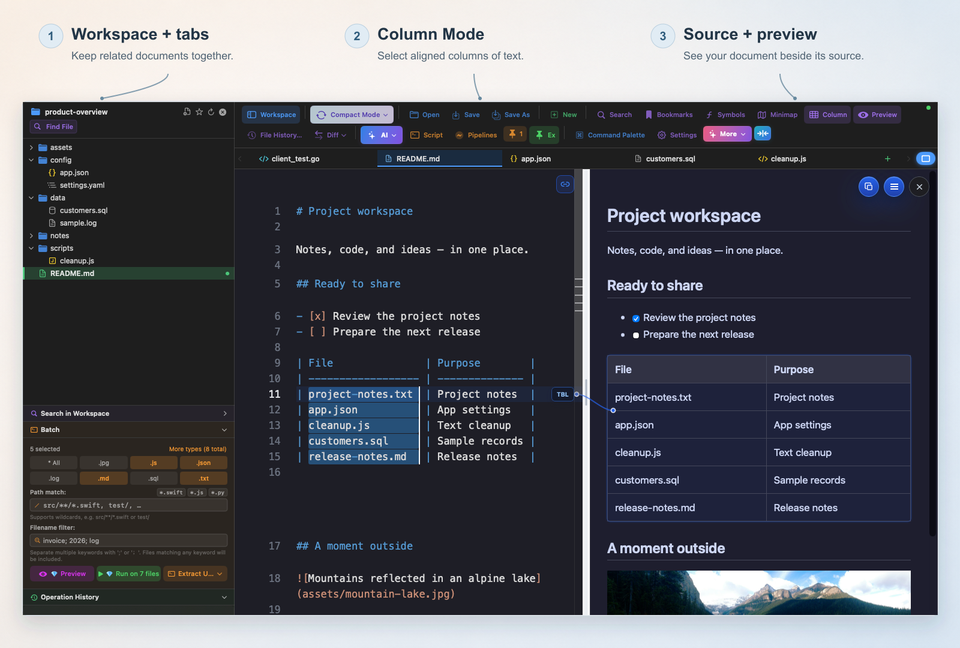
The short answer
Stay with CotEditor if it already does your daily work. It is free, native, and lightweight. Look for an alternative when one job keeps getting awkward, and pick by that job.
- You want deeper pattern-based search and scripting across many files, with a free mode: BBEdit.
- You want Notepad++-style tabs, Column Mode, folder-wide search, and repeatable cleanup with review before applying: a Notepad++-style editor such as notePad++++.
- You want a general code editor with a large ecosystem: Sublime Text or Visual Studio Code.
What CotEditor does well
According to its own website, CotEditor is a free, open-source Mac text editor available through the Mac App Store. It offers regular-expression find and replace built on the ICU engine, and lets you write your own macros in languages such as AppleScript, JavaScript, Python, Ruby, Perl, PHP, or a UNIX shell. It also lists support for many file encodings with attention to CJK languages.
One practical detail: the project's GitHub page states that CotEditor supports the latest two major macOS releases, and at the time of writing it lists macOS Tahoe 26 or later as the requirement. If your Mac is on an older system, check the requirements before you plan around a current release.
Why people look for an alternative
None of these reasons means CotEditor is a poor editor. They describe jobs that fit other tools better.
- Your work is folder-wide: searching a whole project or changing the same thing across many files.
- You are used to Notepad++ and want its everyday habits back, such as many tabs, Column Mode, and a familiar cleanup routine.
- You repeat the same multi-step cleanup and want to save it instead of redoing it.
- Your Mac cannot run the macOS version a current release requires.
CotEditor vs BBEdit
BBEdit describes itself as a professional HTML and text editor for macOS. It lists grep pattern matching, multi-file search and replace, code folding, and AppleScript and Unix scripting among its features. At the time of writing, its website states that it requires macOS 14.0 or later.
| CotEditor | BBEdit | |
|---|---|---|
| Cost model | Free and open source | 30-day evaluation with all features, then Free Mode; exclusive features need a purchase or a Mac App Store subscription |
| Regular expressions | ICU-based find and replace | Grep pattern matching |
| Scripting | AppleScript, JavaScript, Python, Ruby, Perl, PHP, UNIX shell | AppleScript and Unix scripting |
| Focus | A focused, lightweight editor | A professional editor for writers, web authors, and developers |
The trade-off is mostly depth against simplicity. BBEdit offers more, and part of that is behind a purchase. CotEditor offers less surface area at no cost.
BBEdit vs Notepad++
People who search for BBEdit vs Notepad++ are usually asking which Mac tool replaces the everyday Notepad++ jobs. Notepad++ itself is a Windows program, and the official project does not publish a Mac version. The guide to running Notepad++ on a Mac covers the workarounds.
On the Mac, BBEdit is the option with the heaviest text-processing toolbox. It does not run Notepad++ plugins, and Notepad++ does not run BBEdit's tools. Compare them by the tasks you do, not by feature lists.
Where a Notepad++-style editor fits
notePad++++ is an independent Mac app built around the everyday workflow many Notepad++ users know. It has multi-tab editing, Column Mode, Regex Find & Replace, Workspace Search, Markdown Preview, Script Pipelines, and Batch Processing with diff preview and rollback for broad changes.
It does not run Notepad++ plugins, and it is not affiliated with or endorsed by the Notepad++ project. Its strength is combining search, transformation, and review in one window, so a repeated cleanup becomes a saved sequence instead of a manual routine.
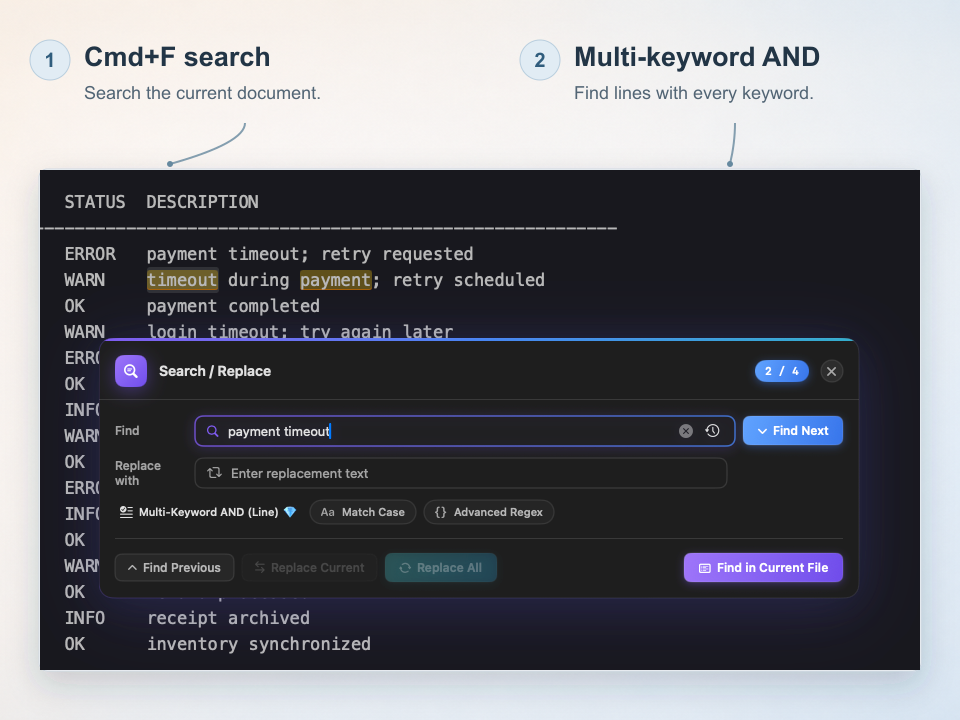
Actual Command-F search using a fictional log file. Multi-Keyword AND (Line) finds both words on one line, in either order. The dialog shows the second of four matches. This search mode requires Pro access or an eligible trial.
How to choose
| If you mainly want | Start with |
|---|---|
| A free, lightweight native editor for everyday text and code | CotEditor |
| Deep pattern-based search and scripting, with a free mode to try | BBEdit |
| Notepad++-style tabs, Column Mode, and review-first batch cleanup | notePad++++ |
| A general-purpose code editor with a large ecosystem | Sublime Text or Visual Studio Code |
Test with one real task rather than a demo file: open a folder, search for a pattern, change it in several places, and see which tool makes you switch windows the least.
FAQ
Is CotEditor free?
Yes. The CotEditor website describes it as free and as an open-source project, and it is available through the Mac App Store.
Is BBEdit free?
BBEdit includes a 30-day evaluation with all features enabled. After that you can keep using it in Free Mode, or unlock its exclusive features with a purchase or a Mac App Store subscription. Check the BBEdit website for current prices.
Which Mac editor is closest to Notepad++?
None is identical, because Notepad++ is a Windows program. BBEdit is the heaviest text-processing option, CotEditor is the lightest free one, and notePad++++ is built around Notepad++-style workflows such as tabs, Column Mode, and folder-wide search.
Can CotEditor handle Japanese, Chinese, or Korean text files?
The CotEditor website says it supports a wide range of file encodings and is optimized for CJK languages. Test one of your real legacy files before you rely on it.
Notepad++ is a trademark of its respective owner. notePad++++ is an independent macOS text editor and is not affiliated with, endorsed by, or approved by the official Notepad++ project.