
Clean up a list without leaving the editor
Sort and Remove Duplicate Lines on Mac
TextEdit has no command for sorting lines or removing duplicates, and the Terminal answers are easy to get subtly wrong. Here are the reliable options, including what each one does to your original order and your blank lines.
Why this is harder than it looks
Sorting a list and deleting repeated lines are two of the most common text chores. On a Mac they are also two of the ones the built-in tools handle poorly. TextEdit does not offer a command for either, so people end up pasting into a spreadsheet or dropping to Terminal.
Both jobs have a hidden decision in them: what should happen to the original order, and what counts as a duplicate. The methods below make different choices, so it is worth knowing which one you are using.
Option 1: Terminal
Two commands cover most cases. Replace list.txt with your file name.
sort -u list.txt > cleaned.txt
sort -u sorts the lines and keeps one copy of each. Because it sorts, your original order is gone.
awk '!seen[$0]++' list.txt > cleaned.txt
The awk command keeps the first occurrence of every line and leaves the order as it was. On macOS it also collapses repeated blank lines into a single blank line, since blank lines are identical to each other.
Always write to a new file, as above. Redirecting output back onto the file you are reading empties it.
Option 2: Built-in scripts in notePad++++
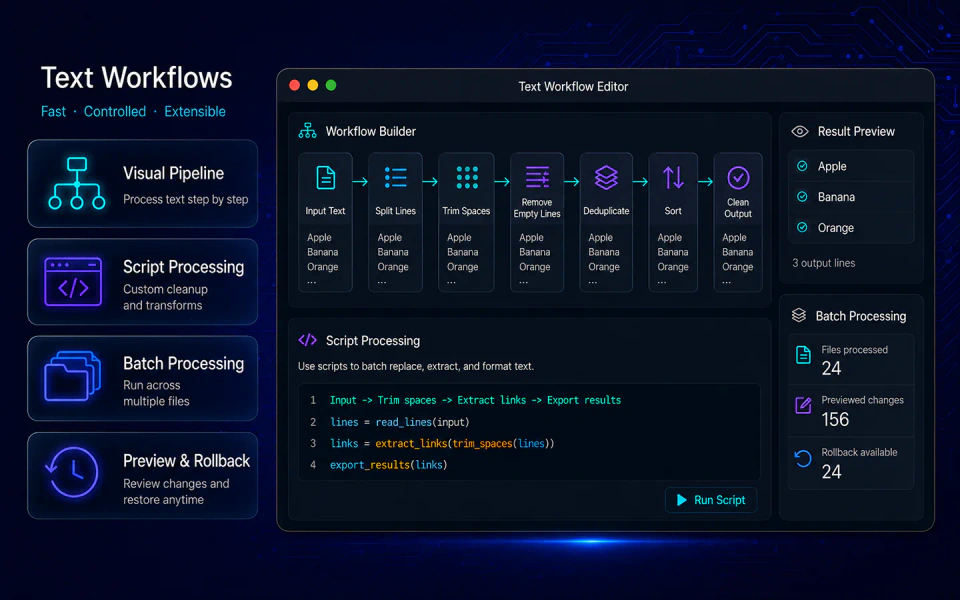
notePad++++ ships with ready-made scripts for these jobs, and shows a preview before it changes anything.
- Open the file, or paste your list into a new tab.
- Open the script window.
- Choose Deduplicate Lines (Keep Order), Sort Lines A-Z, or Sort Lines Z-A.
- Run it on the current file. To limit it to part of the text, select one block of text, right-click, and choose Run Current Script on Selection. The script needs a single, non-empty selection.
- Review the diff preview, then apply the result, or cancel to leave the file alone.
What each script actually does
- Deduplicate Lines (Keep Order) compares lines exactly, including capitals and spaces. It keeps the first occurrence of each line and leaves the order unchanged. Blank lines count as duplicates of each other, so one is kept.
- Sort Lines A-Z / Z-A ignores capital letters and accents when comparing, and understands numbers inside text, so
file2comes beforefile10. Blank lines sort to the top.
These behaviors are worth knowing. A plain byte-order sort puts file10 before file2 and every capital letter before every lowercase one, which is rarely what you want for a list a person will read.
Clean first, then deduplicate
The most common reason deduplication seems to fail is invisible: two lines look identical but one ends with a trailing space. Because comparison is exact, they are different lines.
A reliable order for messy input is:
- Trim Trailing Whitespace
- Remove Empty Lines, if you do not need blank lines
- To Lowercase, if capitals should not matter
- Deduplicate Lines (Keep Order)
- Sort Lines A-Z, if you want a sorted result
If you run this sequence often, chain the steps into a Script Pipeline and run it in one go.
Which method to use
| You want | Use |
|---|---|
| A sorted, unique list from a file, quickly | sort -u in Terminal |
| Duplicates removed, original order kept | awk in Terminal, or Deduplicate Lines (Keep Order) |
| To see what changes before it happens | notePad++++ scripts with the diff preview |
| To treat Banana and banana as the same | To Lowercase first, then deduplicate |
| To clean only part of a document | Select the text and run the script from the context menu |
FAQ
Does removing duplicate lines change the order of my list?
It depends on the method. The Deduplicate Lines (Keep Order) script and the awk command below keep the first occurrence of each line in its original position. sort -u sorts the list as it removes duplicates, so the original order is lost.
Are blank lines treated as duplicates?
Yes. Blank lines are identical to each other, so only the first blank line survives. If you want to remove all blank lines instead, use the Remove Empty Lines script.
Are lines that differ only by capital letters duplicates?
Not by default. Deduplication compares lines exactly, so Banana and banana both stay. Convert the text to lowercase first if you want them treated as the same.
Can I preview the result before applying it?
In notePad++++ the script result appears in a diff preview first, so you can review what will change and cancel without touching the file.
Notepad++ is a trademark of its respective owner. notePad++++ is an independent macOS text editor and is not affiliated with, endorsed by, or approved by the official Notepad++ project.